Presentation Template - Hairdress: Elevating Your Salon and Style Portfolio
Visual communication is the backbone of the beauty and fashion industry. When you are pitching a new salon concept, showcasing a seasonal color palette, or presenting a personal portfolio to potential clients, the quality of your slide deck matters as much as the content itself. The Presentation Template - Hairdress is designed specifically to bridge the gap between creative artistry and professional business communication. While this template is versatile enough for creative agencies, startups, and corporate profiles, its core strength lies in its ability to display high-impact imagery and stylish typography that resonates with fashion-forward audiences.
Many professionals in the hairdressing and beauty sectors underestimate the technical requirements of a good presentation. They often assume that simply dropping photos into a generic corporate template will suffice. However, the Presentation Template - Hairdress offers a specialized layout structure that respects the aspect ratios of portrait photography and the minimalist aesthetic required for luxury branding. Understanding how to leverage this specific tool can prevent common design failures that undermine your credibility before you even speak.
Overlooking the Master Slide Architecture
One of the most frequent mistakes users make when adopting a new design asset is editing individual slides rather than utilizing the Master Slide feature. This template includes 36 unique slides based on a robust Master Slide system. When beginners bypass this architecture, they create significant inefficiencies. You might spend hours adjusting font sizes or logo placements on a single slide, only to realize later that the changes do not propagate across the deck. This leads to inconsistent branding and wasted time.
To avoid this, always start by exploring the View > Slide Master menu in PowerPoint. The Presentation Template - Hairdress has been handcrafted with global settings that allow you to change color schemes, fonts, and logo positioning across all 36 slides simultaneously. By respecting the underlying structure, you ensure pixel-perfect consistency. This approach not only saves time but also maintains the professional integrity of the design, ensuring that your pitch deck or portfolio looks cohesive from the first slide to the last.
Misunderstanding Image Placeholders and Resolution
In the hairdressing and fashion niche, image quality is non-negotiable. A common error occurs when users drag and drop images directly onto the slide canvas instead of using the designated picture placeholders. While the template features easy customizable contents, ignoring the placeholder functionality often results in stretched, cropped, or pixelated images. This is particularly damaging when showcasing detailed hair textures or makeup artistry where clarity equals competence.
The placeholders in this template are engineered to maintain specific aspect ratios that complement the layout. When you use the "drag and drop" method correctly within these frames, the software automatically masks and centers the image without distorting it. Furthermore, be mindful of file size. High-resolution photography is essential for print-quality portfolios, but massive files can make your .PPTX sluggish during a live presentation. Optimize your images to a web-friendly resolution (usually 150-200 PPI for screen presentations) before inserting them. This balances visual fidelity with performance, ensuring your presentation flows smoothly during client meetings.
The Trap of Preview Assets
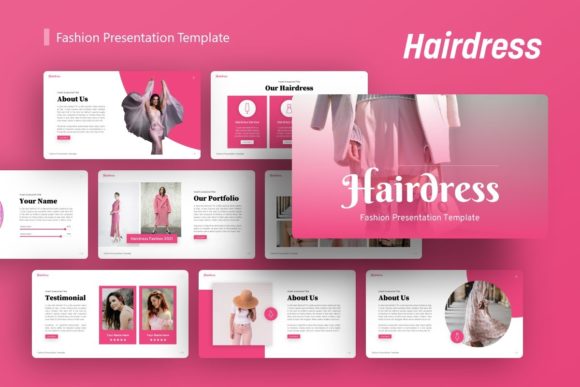
It is vital to address a misunderstanding that causes frustration for many first-time buyers. All images seen in the demo version of the Presentation Template - Hairdress are for preview purposes only and are not included in the downloadable files. Some users mistakenly believe they are purchasing a ready-to-use portfolio complete with stock photography. When they open the file and see generic placeholders, they feel disappointed.
View this exclusion as a benefit rather than a drawback. Using the same stock photos as everyone else dilutes your brand identity. The template provides the vessel; your unique work provides the value. Before purchasing, audit your own image library. Ensure you have at least 10-15 high-quality vertical and horizontal images ready to populate the slides. If you lack assets, budget separately for licensed stock photography or schedule a test shoot. Having your content prepared before opening the file streamlines the customization process and prevents the project from stalling.
Neglecting Vector Scalability in Infographics
This template includes handcrafted infographics and vector icons, which are essential for explaining pricing tiers, service menus, or business growth metrics. A critical oversight is treating these vectors as static raster images. If you need to resize an infographic to fit a different layout or adjust colors to match your salon’s branding, converting it to a PNG or JPEG first will destroy its editability.
All graphics in the Presentation Template - Hairdress are fully resizable and editable within PowerPoint. Keep them as native vector objects. This allows you to ungroup elements and modify individual shapes or colors without losing sharpness, regardless of how large you scale them for projection screens or printed handouts. For entrepreneurs and marketers, this flexibility is crucial. You may need to adapt a standard service menu slide into a landscape social media post or a square Instagram story. Maintaining vector integrity ensures your brand assets remain crisp across every medium.
Failing to Utilize Documentation and Resources
Eagerness to start designing often leads users to skip the included documentation file. This is a missed opportunity. The documentation for this template contains specific instructions on font pairings, color hex codes, and icon usage that are not immediately obvious within the interface. Skipping this step can lead to accidental font substitutions that break the visual hierarchy or color clashes that violate accessibility standards.
Additionally, the package includes a set of vector icons tailored for the industry. Many presenters ignore these and search for mismatched free icons online, resulting in a disjointed visual language. Review the included icon set first. These assets were selected to harmonize with the template’s line weight and style. Using the provided resources ensures that your bullet points, service lists, and contact slides maintain the same level of polish as the hero slides.
Evaluating Versatility Beyond the Niche
While named for hairdressing, limiting your evaluation solely to salon use cases restricts the template's ROI. The clean lines and ample whitespace make it equally effective for photographers, creative agencies, and personal portfolios. When deciding if this is the right tool, look past the demo content and evaluate the structural versatility.
Ask yourself if the 36-slide variety covers your actual needs. Do you need data-heavy charts for a startup pitch, or mood boards for a creative direction meeting? This template supports both, but you must verify that the ratio of text-heavy to image-heavy slides aligns with your narrative. If you are a business owner focusing on financial projections, ensure the infographic slides meet your data visualization needs. If you are a stylist building a lookbook, confirm there are enough full-bleed image layouts. Matching the template’s structural strengths to your specific communication goals prevents the need for extensive custom slide creation later.
Ultimately, the Presentation Template - Hairdress is a professional instrument. Treating it with technical respect and strategic foresight transforms it from a simple download into a powerful asset for business growth. By avoiding common pitfalls regarding master slides, image handling, and resource utilization, you ensure that your final presentation is as refined and precise as the services you offer.