Wirelabs Presentation Template: A Versatile Design Tool
Creating a compelling visual narrative often feels like a balancing act between aesthetic appeal and clear communication. For professionals, creatives, and entrepreneurs, the Presentation Template - Wirelabs serves as a comprehensive solution to bridge this gap. Rather than starting from a blank canvas, this template provides a structured yet flexible foundation designed to elevate your content. It is more than just a collection of slides; it is a curated design system that allows users to focus on their message while ensuring the visual delivery remains polished and professional.
At its core, Wirelabs is built for versatility. Whether you are launching a startup, showcasing a photography portfolio, or delivering a quarterly corporate report, the design language adapts to your specific needs. The template removes the technical friction associated with high-end design, making premium visuals accessible to beginners and seasoned presenters alike. By leveraging pre-designed layouts, you can transform raw data and ideas into an engaging story without spending hours adjusting alignment or color palettes.
Core Features That Streamline Your Workflow
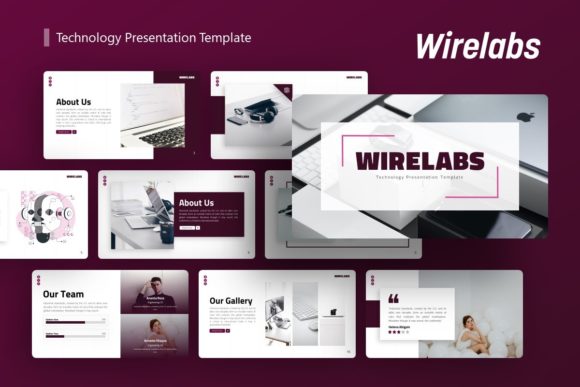
The true value of any presentation asset lies in its usability. Wirelabs includes 36 unique slides for each template variation, providing ample variety to prevent visual fatigue during longer presentations. This extensive library ensures that you have the right layout for every type of content, from text-heavy explanations to image-focused showcases.
Customization is intentionally straightforward. The template is based on Master Slides, which is a critical feature for efficiency. When you update a logo, font, or color scheme on a master slide, those changes propagate instantly across relevant slides. This global editing capability saves significant time and maintains consistency throughout your deck. Additionally, all graphics are fully resizable and editable. You are not locked into static images; instead, you work with vector elements that remain crisp at any dimension.
For those who need to visualize complex information, the handcrafted infographics are a standout feature. These are not generic clip-art additions but are integrated directly into PowerPoint. You can edit the data and labels within the native software, allowing for dynamic updates without needing external graphic design tools. The inclusion of drag-and-drop picture placeholders further simplifies the process, letting you swap preview images with your own content in seconds.
Diverse Applications Across Industries
One of the primary reasons users gravitate toward the Presentation Template - Wirelabs is its adaptability across different sectors. The clean, modern aesthetic avoids overly niche styling, making it suitable for a wide range of professional and personal contexts.
- Creative Agencies and Portfolios: Visual professionals need templates that enhance rather than distract from their work. Wirelabs offers minimalist layouts that let photography and design projects take center stage. The grid-based structures are ideal for displaying case studies or artistic collections.
- Startups and Pitch Decks: When seeking investment, clarity is paramount. The template includes specific slides tailored for business models, market analysis, and team introductions. These layouts help structure your pitch logically, guiding potential investors through your narrative with visual cues that reinforce key metrics.
- Corporate and Business Profiles: Established companies require a tone of reliability and sophistication. The corporate layouts within Wirelabs balance professionalism with modern design trends, suitable for internal training, client proposals, or annual reviews.
- Personal Branding: Freelancers and consultants can use this template to create personal portfolios or service decks. It provides a cohesive visual identity that helps individuals stand out in competitive markets.
Understanding What Is Included
Before downloading or purchasing, it is helpful to understand exactly what files you will receive. The package includes the primary PowerPoint .PPTX file, which is compatible with standard versions of Microsoft PowerPoint. Alongside the presentation itself, you receive a documentation file that guides you through the editing process, ensuring even novices can navigate the master slides and infographic editing features.
A dedicated vector icon set is also included. Icons are essential for breaking up text and adding visual interest, and having a matching set ensures your slides look unified. However, a crucial note for new users: all images seen in the demo are for preview purposes only. They are not included in the downloadable files. This is standard industry practice, as it allows you to insert your own licensed or original imagery without worrying about copyright restrictions associated with stock photos.
Practical Considerations Before You Begin
While Wirelabs is designed for ease of use, getting the best results requires some preparation. Because the template relies on Master Slides, it is beneficial to spend a few minutes exploring the Slide Master view before editing individual pages. Understanding this hierarchy prevents accidental formatting issues and maximizes the efficiency of global changes.
Consider your content volume before selecting specific layouts. With 36 slides available, there is a temptation to use many variations. However, effective presentations often benefit from restraint. Choose the layouts that best support your specific narrative arc rather than using a new design for every single point. Consistency aids audience retention, so utilize the recurring design elements to create a rhythmic visual experience.
Also, think about aspect ratio. Ensure the template dimensions match the display equipment you will be using. Most modern templates default to 16:9 widescreen, which is standard for digital displays and projectors. If you are presenting in a non-standard environment, verify that the resizable graphics and master slides adjust correctly when changing slide sizes.
Why Design Quality Matters for Engagement
In an era of information overload, the quality of your visual aid directly impacts how your message is received. Pixel-perfect illustrations and professional typography signal competence and attention to detail. When an audience sees a well-crafted deck, they subconsciously attribute that same level of care to the speaker’s expertise and the validity of the content.
The Presentation Template - Wirelabs addresses this psychological aspect of presenting. By providing pixel-perfect assets and harmonious color schemes, it eliminates the "amateur" feel that can undermine confidence. For educators, this means students stay focused on the lesson rather than distracting formatting errors. For marketers, it means the brand perception remains elevated. For entrepreneurs, it suggests that the business itself is organized and polished.
Making the Most of Editable Infographics
Data visualization is often the most challenging part of presentation design. Static charts copied from Excel rarely look good on a slide. Wirelabs solves this with native PowerPoint infographics. Because these are handcrafted within the software, they behave like standard shapes and text boxes.
To use these effectively, identify the story behind your data before choosing a chart type. Use timeline graphics for company history or project roadmaps. Utilize circular or radial diagrams for processes and cycles. Bar and column charts should be reserved for direct comparisons. Since every element is editable, you can adjust colors to match your brand guidelines precisely, ensuring that even complex data feels like a natural extension of your overall design theme.
Final Thoughts on Implementation
Ultimately, a template is a tool to facilitate communication, not replace it. The Presentation Template - Wirelabs excels because it handles the heavy lifting of design structure, freeing you to refine your script and delivery. Whether you are preparing a pitch deck for a new venture or updating a personal portfolio, the combination of 36 versatile slides, master-slide functionality, and editable vector graphics provides a robust platform for success.
By understanding the features and preparing your content thoughtfully, you can leverage this template to create presentations that are not only visually stunning but also deeply effective. Remember to utilize the included documentation, respect the master slide architecture, and always prioritize your unique content over decorative excess. With these practices in place, Wirelabs becomes more than a download; it becomes an integral part of your professional storytelling toolkit.