Evaluating Presentation Template - Fabricate for Professional Use
Selecting the right visual framework is a critical step in preparing any professional presentation. For designers, agencies, and business professionals seeking a versatile solution, Presentation Template - Fabricate offers a structured approach to slide creation. This template is designed to serve a broad spectrum of use cases, ranging from creative agency portfolios and corporate profiles to startup pitch decks and personal photography showcases. Understanding its specific features, capabilities, and limitations is essential for determining whether it aligns with your current project requirements and long-term workflow needs.
Core Functionality and Design Scope
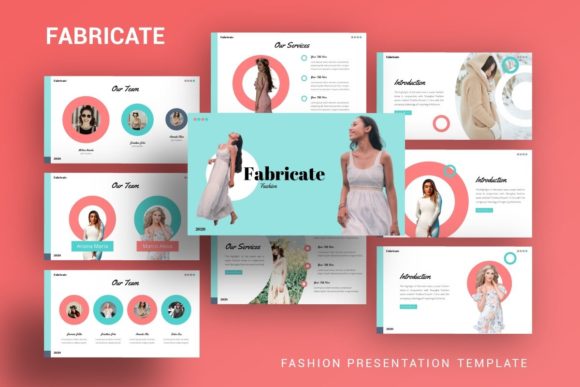
Presentation Template - Fabricate is fundamentally a comprehensive PowerPoint (.PPTX) asset package aimed at reducing design time while maintaining high visual standards. At its core, the template provides 35 unique slides per variation, offering substantial depth for detailed narratives without requiring users to build layouts from scratch. The design philosophy centers on modularity and ease of editing, utilizing Master Slides to ensure global consistency across the deck. This architecture allows users to change fonts, colors, or logos in one location and have those updates propagate automatically throughout the presentation.
The inclusion of handcrafted infographics distinguishes this template from basic layout packs. Rather than relying on generic chart tools, the infographics are built as native vector elements within PowerPoint. This means they remain fully resizable and editable without losing quality or requiring external software like Adobe Illustrator. For users who need to visualize data, processes, or timelines, these pre-designed elements provide a significant advantage over standard SmartArt, offering a more bespoke aesthetic that can still be customized to match brand guidelines.
Strategic Benefits for Diverse Audiences
The primary value proposition of Presentation Template - Fabricate lies in its adaptability. For creative agencies and photographers, the template provides a clean, grid-based structure that prioritizes imagery. The picture placeholders utilize drag-and-drop functionality, streamlining the process of swapping stock photos for actual portfolio work. This reduces the technical friction often associated with formatting image-heavy slides, allowing creatives to focus on curation rather than alignment.
For corporate and business users, the benefit shifts toward efficiency and professionalism. The 35-slide library covers standard business communication needs, including team introductions, service overviews, financial data visualization, and strategic roadmaps. Because the graphics are pixel-perfect and vector-based, the output remains crisp regardless of screen size or projection resolution. This reliability is crucial for pitch decks and company profiles where visual polish directly influences stakeholder perception.
Startups and entrepreneurs may find particular value in the template’s structured narrative flow. Pitch decks require a specific cadence to effectively communicate value propositions, market opportunity, and traction. Having a pre-organized set of slides helps enforce this logical progression, ensuring that no critical information is overlooked during the drafting phase. The ability to edit all graphic elements also means that even early-stage companies without dedicated design teams can produce investor-ready materials.
Tradeoffs and Practical Considerations
While Presentation Template - Fabricate offers robust utility, potential users must weigh certain tradeoffs. The most immediate consideration is the licensing of visual assets. As noted in the product documentation, all images shown in the demo are for preview purposes only and are not included in the downloadable files. Users must budget time and potentially financial resources to source their own high-quality photography or illustrations. Relying on low-resolution or mismatched stock photos can undermine the premium feel of the template, so having an existing media library or a subscription to a stock service is practically a prerequisite for achieving the intended look.
Another factor is the learning curve associated with Master Slides. While this feature is powerful for maintaining consistency, it can be confusing for users accustomed to editing individual slide elements directly. Modifying global styles requires navigating the Slide Master view in PowerPoint. Users unfamiliar with this workflow may initially struggle to make systemic changes, though the included documentation file aims to mitigate this issue. It is advisable to review the documentation before beginning customization to avoid unnecessary rework.
Additionally, while the template is compatible with PowerPoint, complex vector edits may sometimes behave differently across various versions of the software or when converted to PDF. Users should test their final output on the actual presentation hardware or platform they intend to use. The "pixel-perfect" claim assumes proper rendering; exporting to older formats or using incompatible fonts can occasionally alter spacing or alignment.
Situational Fit: When to Choose This Template
Presentation Template - Fabricate is a strong fit for users who prioritize speed without sacrificing customizability. It is particularly well-suited for:
- Multi-Purpose Organizations: Companies that need a single master template that can be adapted for internal reports, external sales pitches, and recruitment presentations.
- Visual-First Portfolios: Photographers and designers who need a minimalist backdrop that enhances rather than distracts from their work.
- Data-Driven Narratives: Consultants and analysts who require professional infographic layouts but lack the time to design custom charts for every new report.
- Non-Designers: Business professionals who need to produce polished decks independently and cannot wait for internal design team turnaround times.
In these scenarios, the combination of 35 diverse slides, editable vectors, and master slide architecture provides a balanced ecosystem for rapid, high-quality production.
When Alternatives May Be Preferable
Despite its versatility, this template may not be the optimal choice for every situation. Users should consider alternatives if:
- Highly Specialized Data Visualization is Required: If your presentation relies heavily on dynamic, real-time data linking or complex statistical modeling, a template focused on static infographics may be limiting. Dedicated data visualization tools or Excel-integrated templates might be more appropriate.
- Brand Guidelines Are Extremely Rigid: While the template is editable, retrofitting a pre-made design to match strict corporate identity systems can sometimes take longer than building a simple custom deck from scratch. If your brand uses non-standard grids or proprietary typography, evaluate whether the Master Slide structure accommodates these constraints easily.
- Collaborative Cloud Workflows Are Primary: If your team works exclusively in cloud-based platforms like Google Slides or Canva, converting a .PPTX file may result in formatting loss. Ensure your workflow supports native PowerPoint editing before purchasing.
- Minimal Content Needs: For a five-slide update or a simple announcement, a 35-slide template may introduce unnecessary complexity. Lighter, more focused templates could reduce cognitive load and setup time.
Making the Final Decision
Evaluating Presentation Template - Fabricate ultimately comes down to assessing your resource availability and output goals. If you possess the necessary imagery and are comfortable with PowerPoint’s master slide environment, this template serves as a reliable foundation for professional communication. Its strength lies in bridging the gap between generic office templates and expensive custom design services. By providing handcrafted, editable assets within a familiar software environment, it empowers users to maintain visual consistency across varied presentation types. However, success depends on realistic expectations regarding asset sourcing and technical proficiency. Review the documentation, verify compatibility with your current software version, and ensure the slide variety matches your narrative structure before integrating it into your workflow.