Evaluating Presentation Template - Upvision for Professional and Creative Use
Selecting the right slide deck architecture is often less about aesthetic preference and more about operational efficiency. When professionals evaluate resources like the Presentation Template - Upvision, they are typically looking for a balance between visual impact and technical flexibility. This template is designed as a multi-purpose asset, positioning itself as a viable solution for creative agencies, corporate profiles, startups, and personal portfolios. However, understanding its specific utility requires looking beyond the preview images to analyze the underlying structure, editability, and long-term value compared to other market options.
Structural Versatility Across Business Verticals
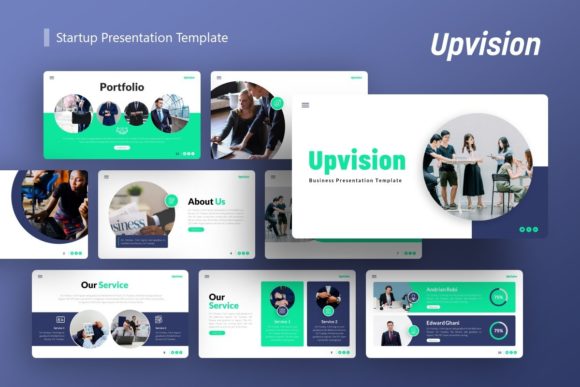
The primary distinction of the Upvision template lies in its claimed adaptability across divergent industries. Most presentation assets tend to specialize; a pitch deck template often lacks the depth required for a company profile, while a portfolio template may lack the data visualization tools necessary for a business report. Upvision attempts to bridge this gap through a comprehensive 36-slide library per template variation.
For Creative Agencies and Portfolios, the template emphasizes visual hierarchy and image handling. The inclusion of drag-and-drop picture placeholders suggests a workflow optimized for users who need to swap assets quickly without breaking layout integrity. This is critical for photographers and designers who must update decks frequently with new work. In contrast, generic business templates often treat images as secondary elements, forcing creative professionals to manually adjust masks and frames.
Conversely, for Corporate and Startup Pitch Decks, the value proposition shifts toward information density and clarity. The template includes handcrafted infographics based on master slides. This feature is significant for users presenting financial projections, roadmaps, or organizational charts. Unlike templates that rely on flattened raster images for charts, master-slide-based infographics allow for direct editing within PowerPoint. This ensures that data remains accurate and editable without requiring external graphic design software, a common friction point when using highly stylized but rigid alternatives.
Technical Editability vs. Visual Complexity
A frequent tradeoff in premium presentation design is the inverse relationship between visual sophistication and ease of editing. Highly designed slides often utilize complex grouping, locked layers, or non-standard fonts that frustrate end-users. When evaluating Presentation Template - Upvision, prospective buyers should assess the "Easy customizable contents" claim against their own technical proficiency.
The reliance on Master Slides is a positive technical indicator. Master slides govern global changes across multiple layouts, meaning a user can alter a color scheme or logo placement once and have it propagate throughout the deck. This contrasts with lower-quality alternatives where formatting must be adjusted slide-by-slide. For teams managing brand consistency across multiple departments, this architecture reduces the risk of off-brand presentations.
Furthermore, the specification that all graphics are resizable and editable vectors addresses a major limitation found in many mid-tier templates. Rasterized graphics pixelate when projected on large screens or resized for different aspect ratios. Vector elements maintain crispness at any scale, which is essential for modern hybrid meeting environments where content is viewed on everything from mobile devices to conference room walls. Users comparing options should verify whether competing templates offer true vector editability or merely high-resolution PNGs, as the latter limits future-proofing.
Comparing Upvision to Alternative Solutions
To make an informed decision, it is helpful to contextualize Upvision against other categories of presentation resources available to professionals aged 20–50.
Upvision vs. Free or Basic Templates
Free templates often serve as adequate starting points for internal memos or low-stakes updates. However, they typically lack the "pixel-perfect illustrations" and cohesive infographic systems found in paid assets like Upvision. The time cost of customizing a free template to look professional often exceeds the monetary cost of a premium asset. If your objective is client-facing communication or investor relations, the polish differential usually justifies the investment. Upvision fits best when the opportunity cost of amateur design is high.
Upvision vs. SaaS Presentation Builders
Cloud-based presentation platforms offer collaboration features and AI generation that static .PPTX files cannot match. However, they often suffer from vendor lock-in, subscription fatigue, and limited offline capabilities. Upvision provides a perpetual license model via standard PowerPoint files. For organizations with strict data security protocols, limited internet access during travel, or a desire to avoid recurring costs, a downloadable template offers superior ownership. The tradeoff is the loss of real-time co-authoring, making Upvision better suited for individual creators or teams with established asynchronous review workflows.
Upvision vs. Niche-Specific Templates
If a user has a singular, unchanging need (e.g., exclusively medical case studies or exclusively real estate listings), a niche-specific template may offer deeper industry relevance than a multi-purpose option. Upvision’s strength is breadth. It is the stronger choice for generalists, consultants, or agencies serving multiple clients. If you anticipate needing to pivot between a startup pitch today and a photography portfolio tomorrow, the versatility of Upvision outweighs the specialized depth of a single-industry alternative.
Decision Factors and Best-Fit Scenarios
Determining whether Presentation Template - Upvision is the correct resource depends on specific project parameters and user constraints. Below are practical scenarios to guide evaluation.
- Ideal for Multi-Disciplinary Freelancers: If you manage your own personal brand alongside client work, having a unified system that handles both portfolio displays and business proposals saves cognitive load and maintains visual consistency.
- Ideal for Non-Designers in Corporate Roles: Marketing managers or founders who lack Adobe Illustrator skills benefit significantly from the pre-built, editable vector infographics. It bridges the gap between needing custom data viz and lacking the skills to build it from scratch.
- Less Suitable for Rapid Collaboration Teams: If your workflow requires five people editing the same deck simultaneously with version history, a cloud-native tool is superior. Upvision is a file-based asset, best for controlled editing environments.
- Less Suitable for Minimalist Purists: With 36 slides and rich illustrations, this template leans toward comprehensive detail. Users seeking ultra-minimalist, text-only Swiss Style layouts may find the included assets excessive and would be better served by a stripped-back alternative.
Understanding File Deliverables and Limitations
Transparency regarding deliverables prevents post-purchase friction. The Upvision package includes the .PPTX file, documentation, and vector icons. The documentation file is particularly valuable for users unfamiliar with master slide manipulation; skipping this step is the most common cause of user error with complex templates.
It is crucial to note that all images in the demo are for preview purposes only and are not included. This is standard industry practice due to licensing restrictions, but it impacts immediate usability. Buyers must budget time and potentially additional funds for stock photography or original assets. When comparing prices with competitors, factor in whether they include licensed imagery or operate on the same preview-only basis. A slightly cheaper template without documentation or organized master slides may ultimately cost more in labor hours than a well-documented asset like Upvision.
Final Considerations for Resource Selection
Presentation Template - Upvision represents a robust middle-ground solution in the digital asset marketplace. It avoids the disposability of free resources while avoiding the recurring costs and platform dependency of SaaS tools. Its 36-slide count and master-slide architecture suggest a product built for repeated, varied use rather than one-off projects.
For professionals evaluating this template, the decision should hinge on the need for editable vector infrastructure and cross-vertical versatility. If your work demands frequent transitions between creative showcasing and corporate reporting, and you require full ownership of your presentation assets, Upvision aligns well with those requirements. However, if your needs are hyper-specialized or strictly collaborative, exploring niche or cloud-based alternatives remains a valid strategic choice. Ultimately, the value of any presentation template is measured not by its preview aesthetics, but by how efficiently it translates your content into a polished format without technical friction.