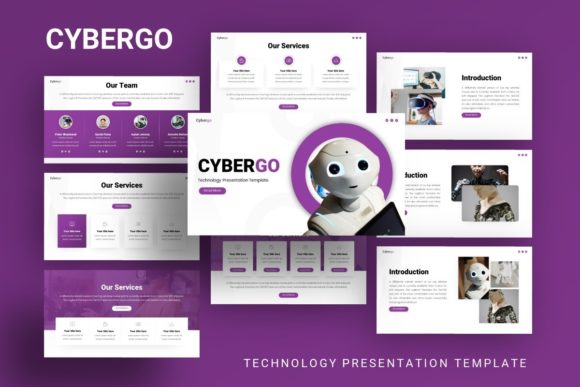
Presentation Template - Cybergo: Design for Impact
In a digital landscape saturated with generic slide decks, finding a presentation framework that balances technical precision with creative flexibility is a genuine challenge. The Presentation Template - Cybergo addresses this gap by offering a structured yet highly adaptable design system tailored for modern communicators. Whether you are pitching a tech startup, showcasing a photography portfolio, or outlining a corporate strategy, this template serves as more than just a background; it acts as a visual scaffold that elevates your narrative without overshadowing your message.
Cybergo distinguishes itself through its focus on usability and professional aesthetics. It moves beyond the cluttered, over-designed slides that often plague business presentations, opting instead for clean lines, purposeful whitespace, and handcrafted infographics. For professionals aged twenty to fifty who value both efficiency and style, this template provides a reliable foundation. It allows you to bypass the initial design paralysis and move straight into content curation, ensuring that your ideas are presented with clarity and confidence.
Core Features That Drive Professional Results
The utility of any presentation asset lies in its technical execution and ease of modification. Cybergo is engineered to streamline the creation process while maintaining high visual standards. Understanding these features helps users leverage the template effectively across different projects.
- 35 Unique Slides: Variety prevents audience fatigue. With thirty-five distinct layouts, you can match specific slide designs to different types of content, from data-heavy analysis to emotional storytelling.
- Master Slide Architecture: Changes made at the master level propagate instantly across relevant slides. This ensures global consistency in fonts, colors, and logo placement, which is essential for brand integrity.
- Handcrafted Infographics: Rather than relying on generic stock charts, Cybergo includes custom-built data visualization tools. These are fully editable within PowerPoint, allowing you to turn complex statistics into digestible visual insights.
- Pixel-Perfect Illustrations: Visual assets are optimized for screen display, ensuring crisp rendering whether projected in a boardroom or viewed on a laptop during a remote meeting.
- Drag-and-Drop Functionality: Picture placeholders are designed for intuitive use, reducing the friction involved in swapping demo images for your own content.
These features collectively reduce the cognitive load associated with design. By handling the structural heavy lifting, the template frees up mental energy for refining your script, rehearsing your delivery, and engaging with your audience.
Adapting Cybergo for Diverse Professional Contexts
Versatility is the hallmark of a superior design tool. While the aesthetic leans towards modern and technological, the underlying structure supports a wide array of applications. Here is how different professionals can interpret and adapt the Presentation Template - Cybergo for specific goals.
Tech Startups and Pitch Decks
For entrepreneurs seeking funding, clarity is currency. Investors review hundreds of decks annually; yours must be legible, logical, and visually credible. Use Cybergo’s infographic slides to illustrate market size, user growth, or technical architecture. The clean aesthetic signals professionalism and attention to detail, traits that investors associate with operational competence. Avoid filling every slide with text; utilize the template’s spacious layouts to highlight key metrics and let your verbal pitch provide the context.
Creative Agencies and Portfolios
Designers and photographers often struggle to present their work within rigid corporate templates. Cybergo offers image-centric layouts that act as digital frames rather than distractions. For a creative agency profile, use the full-bleed image slides to showcase campaign visuals, while utilizing the typography-focused slides to explain your methodology or case study results. The contrast between bold imagery and structured text creates a dynamic rhythm that keeps viewers engaged without competing with your actual portfolio pieces.
Corporate Reporting and Internal Communication
Internal presentations often suffer from visual monotony. When presenting quarterly reviews or strategic shifts, use the template to break down silos of information. The resizable graphic elements allow you to create custom process maps or organizational charts that align with your company’s branding. Consistency here builds trust; when employees see polished, well-organized internal communications, it reinforces a culture of excellence and transparency.
Educators and Workshop Facilitators
Teaching requires pacing and visual reinforcement. Educators can use the varied slide types to signal transitions between lecture segments, interactive activities, and summary points. The pixel-perfect illustrations can serve as visual anchors for complex concepts, aiding retention. Because the content is easily customizable, instructors can update materials semester-to-semester without rebuilding their deck from scratch, making it a sustainable resource for long-term curriculum development.
Strategic Customization for Authentic Storytelling
A template is a starting point, not a final destination. To maximize the impact of Presentation Template - Cybergo, users must inject their unique identity into the framework. Blindly using default settings leads to generic outputs; thoughtful adaptation leads to resonance.
Color Psychology and Brand Alignment: While the demo showcases a specific color palette, you should adjust hues to match your brand guidelines or the emotional tone of your presentation. Tech companies might retain the cool blues and dark modes to convey innovation, while a wellness coach might shift to warmer, softer tones to evoke calm. Use the master slide editor to apply these changes globally, ensuring no rogue colors disrupt the visual flow.
Typography Hierarchy: Readability trumps decoration. Ensure that font sizes remain accessible when projected. Cybergo’s type hierarchy is designed for screens, but always test your slides in the actual presentation environment. If you change fonts, stick to two complementary families maximum—one for headings and one for body text—to maintain visual cohesion.
Content Density Management: The most common mistake in presentation design is overcrowding. Just because a slide layout has five bullet points doesn’t mean you must use all five. Embrace negative space. If a concept requires extensive explanation, split it across multiple slides rather than shrinking text to fit. Your slides should support your speech, not replace it.
Practical Workflow Recommendations
To get the most value from your purchase, approach the file with a systematic workflow. Begin by reviewing the included documentation file. This guide explains the master slide structure and icon usage, preventing frustration later. Next, audit the vector icons provided. Having a consistent icon set included means you won’t need to hunt for mismatched graphics online, preserving the template’s unified aesthetic.
Remember that all images in the demo are for preview purposes only. Plan your visual assets before opening the file. Gather high-resolution photography, finalized logos, and verified data sets first. When you open the .PPTX file, duplicate the slides you intend to use and delete those you don’t. Working with a leaner file improves performance and reduces decision fatigue.
Finally, consider the platform where your presentation will live. If exporting to PDF for email distribution, ensure hyperlinks remain functional. If presenting live, utilize presenter view to keep notes hidden. Cybergo’s resizable elements make it relatively safe to adjust aspect ratios if needed, but always verify alignment after resizing to prevent distortion.
Elevating Communication Through Design
Ultimately, the Presentation Template - Cybergo is a tool for better communication. It removes the technical barriers to entry for high-quality design, democratizing access to professional visuals for freelancers, small business owners, and creatives alike. By providing a robust, editable, and aesthetically considered foundation, it allows you to focus on what truly matters: connecting with your audience and conveying your ideas with precision.
Whether you are launching a product, teaching a class, or rebranding an agency, the way you present information shapes how it is received. Investing time in selecting and properly adapting a quality template is an investment in your professional credibility. Use Cybergo not just to make slides look better, but to think clearer, organize smarter, and communicate more effectively.