Shouldice Presentation Template: A Practical Design Guide
Creating a compelling visual narrative often takes more time than developing the actual content. For professionals balancing tight deadlines with high aesthetic standards, the Presentation Template - Shouldice offers a structured yet flexible solution. This template bridges the gap between rigid corporate layouts and overly artistic designs that lack functional utility. It serves as a comprehensive toolkit for anyone needing to communicate complex ideas clearly, whether you are pitching a startup, showcasing a photography portfolio, or delivering an educational lecture. The value lies not just in the slides themselves, but in the underlying architecture that allows for rapid customization without sacrificing professional polish.
Core Architecture and Design Flexibility
The foundation of any reliable presentation asset is its technical construction. Shouldice is built upon Master Slides, which is a critical feature for maintaining consistency across 35 unique slide layouts. Rather than formatting individual text boxes and shapes on every new page, users can adjust global styles through the master view. This ensures that fonts, color palettes, and logo placements remain uniform throughout the deck, significantly reducing the risk of formatting errors during last-minute edits.
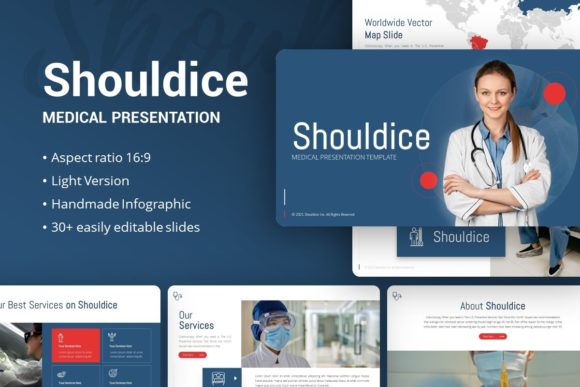
A standout characteristic of this template is the inclusion of handcrafted infographics directly within PowerPoint. Many templates rely on static images for data visualization, forcing users to recreate charts externally if numbers change. With Shouldice, the infographic elements are native vector objects. You can edit data points, resize graphics, and alter colors directly in the software. This pixel-perfect scalability means your visuals remain crisp whether projected on a laptop screen or a large conference hall display. The ability to drag and drop images into pre-defined placeholders further streamlines the workflow, allowing creators to focus on message refinement rather than alignment tools.
Versatile Applications Across Industries
While some design assets are niche-specific, the Presentation Template - Shouldice is engineered for adaptability. Its neutral yet sophisticated aesthetic makes it suitable for a wide spectrum of users aged 20 to 50, from university students to seasoned executives. Understanding how to leverage this versatility is key to maximizing its return on investment.
Creative Agencies and Portfolios
For photographers, designers, and creative agencies, the template functions as a digital canvas. The layout options prioritize negative space and typography, ensuring that visual work takes center stage without competing with decorative clutter. Freelancers can use the portfolio-specific slides to structure case studies effectively, guiding potential clients through a problem-solution-result narrative. The clean lines and modern typography signal professionalism while allowing personal branding to shine through subtle color adjustments.
Corporate Business and Pitch Decks
In commercial environments, clarity drives decision-making. Startups and established businesses can utilize the dedicated pitch deck slides to present market analysis, financial projections, and team introductions. The handcrafted infographics are particularly valuable here; they transform dry statistics into digestible visual stories. Because the files include vector icons, presenters can maintain a cohesive iconography system that reinforces brand identity. This level of visual coherence builds trust with investors and stakeholders, suggesting that the same attention to detail applies to the business operations themselves.
Educational and Personal Use
Educators and trainers benefit from the template’s information-dense layouts that avoid overwhelming audiences. The variety of slide types allows for pacing changes—alternating between full-image impact slides and text-heavy explanation slides keeps engagement high. For personal portfolios or hobbyist projects, the ease of customization lowers the barrier to entry for high-quality design. Users without formal graphic design training can achieve professional results simply by adhering to the template’s grid systems and typographic hierarchy.
Enhancing Communication Efficiency
Beyond aesthetics, the primary benefit of adopting the Presentation Template - Shouldice is operational efficiency. Time is a finite resource for marketers, entrepreneurs, and educators. By providing a pre-validated design system, this template eliminates hours of setup time. However, the efficiency gains extend beyond initial creation. The organized file structure and documentation make future updates manageable. When a quarterly report needs refreshing next year, you aren't rebuilding the deck from scratch; you are simply updating content within an established framework.
This efficiency also impacts audience reception. Consistent design reduces cognitive load for viewers. When slides follow a predictable visual logic, the audience spends less mental energy deciphering layout changes and more energy absorbing the message. The resizable and editable nature of all graphics ensures that accessibility standards can be met regarding contrast and text size, making presentations inclusive for diverse audiences.
Practical Considerations for Implementation
To get the most out of this template, users should approach implementation strategically. First, review the included documentation file before starting. Understanding the master slide relationships prevents accidental layout breaks. Second, take advantage of the vector icon set to create custom visual metaphors rather than relying on generic stock imagery. This adds a layer of uniqueness to standard template slides.
It is important to note that demo images are for preview purposes only and are not included in the downloadable files. Users must source their own high-resolution photography. This is actually a benefit, as it forces the integration of authentic, relevant visuals rather than placeholder art. When selecting images, ensure they match the template’s aspect ratio and resolution requirements to maintain the pixel-perfect quality promised by the design.
Finally, consider branding guidelines early in the process. While the template provides a strong default palette, applying your specific brand colors and typefaces immediately establishes ownership. Because the graphics are fully editable, even the illustrative elements can be tinted to match corporate or personal brand identities. This transforms a generic template into a bespoke communication tool.
Evaluating Fit for Your Needs
Before downloading, assess whether the 35-slide count aligns with your typical presentation length. For most standard business and creative presentations, this volume covers essential scenarios including title slides, section dividers, data visualization, team profiles, and closing remarks. If your work requires highly specialized technical diagrams or industry-specific regulatory tables, you may need to supplement this template with custom slides. However, for the vast majority of generalist and specialist communication needs, the Presentation Template - Shouldice provides a robust, professional foundation.
Ultimately, this template represents a balance between creative freedom and structural discipline. It supports the user's intent rather than dictating it. Whether you are a freelancer building a personal brand or a corporate team standardizing internal communications, the practical features—from master slide integration to editable vector graphics—deliver tangible value. By reducing friction in the design process, it allows presenters to redirect their energy toward what matters most: crafting a clear, persuasive, and memorable message.