Presentation Template - Evergreen: Design Guide
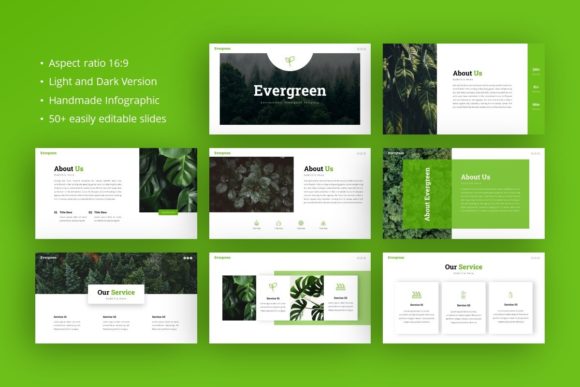
In the fast-paced world of professional communication, the visual quality of a slide deck often dictates how an audience receives your message before you speak a single word. The Presentation Template - Evergreen addresses this critical first impression by providing a structured yet flexible design system suitable for diverse professional needs. Rather than forcing users to build layouts from scratch or rely on generic themes that lack polish, this template offers a curated collection of 35 slides designed to maintain relevance across various industries. Whether you are preparing a pitch deck for investors, showcasing a photography portfolio, or outlining a corporate strategy, the underlying architecture supports clarity and aesthetic consistency without requiring advanced graphic design skills.
Versatility Across Professional Disciplines
The primary value of the Presentation Template - Evergreen lies in its adaptability. Many templates are niche-specific, rendering them useless if your industry shifts or if you need to create decks for different clients. This resource is engineered for broad application, making it a practical asset for creative agencies, startups, educators, and freelancers alike. For a creative agency, the clean lines and ample whitespace allow portfolio pieces to take center stage without competing with decorative background elements. Conversely, a startup founder utilizing the same file can leverage data-driven infographic slides to present market analysis and financial projections with equal authority.
This cross-functional utility extends to personal branding as well. Professionals building a personal portfolio or company profile benefit from layouts that balance text and imagery effectively. The design avoids trendy aesthetics that date quickly, adhering instead to an "evergreen" philosophy where typography and color usage remain professional regardless of current design fads. This longevity means the investment in learning and customizing the template pays dividends over multiple projects and years, rather than requiring a new purchase for every seasonal campaign or business pivot.
Streamlining Workflow with Master Slides
Efficiency in presentation design is rarely about how fast you can draw a shape; it is about how quickly you can apply global changes. The Presentation Template - Evergreen is built upon a robust Master Slide framework within PowerPoint. This technical foundation is crucial for users who manage large decks or collaborative projects. When you adjust a font style, logo placement, or color palette on the master slide, those changes propagate instantly across all 35 associated slides. This eliminates the tedious process of formatting individual pages and ensures visual consistency throughout the document.
For teams working under tight deadlines, this feature reduces the cognitive load associated with design maintenance. Instead of worrying about alignment or spacing on slide twenty-four, you can focus entirely on narrative flow and content accuracy. The drag-and-drop picture placeholders further accelerate this process. Users do not need to crop images externally or struggle with aspect ratios; the template handles these adjustments automatically within the designated frames. This seamless integration between content and container allows non-designers to produce pixel-perfect results that look professionally typeset.
Visualizing Data Through Handcrafted Infographics
One of the most significant challenges in business communication is translating complex data into digestible visuals. Generic chart tools often produce sterile graphics that fail to engage audiences. The Presentation Template - Evergreen includes handcrafted infographics specifically designed for PowerPoint. Unlike static images imported from external software, these graphics are fully editable vector elements. You can modify colors to match your brand guidelines, resize components without losing quality, and update data labels directly within the slide environment.
This capability is particularly valuable for corporate reports and educational materials where retention depends on visual engagement. A marketer explaining user growth can customize a timeline graphic to highlight specific milestones, while an educator can adapt a process diagram to explain theoretical concepts. Because the illustrations are pixel-perfect and resizable, they maintain integrity whether projected on a conference room screen or viewed on a laptop. This flexibility ensures that your data visualization supports your argument rather than distracting from it due to poor resolution or irrelevant styling.
Understanding File Assets and Customization Limits
To maximize the utility of this resource, users must understand exactly what is included and how to manage expectations regarding assets. The download package contains the core PowerPoint .PPTX file, a documentation guide, and a set of vector icons. The documentation is an essential component for those less familiar with master slide editing, providing a roadmap for customization that prevents accidental layout breakage. The included vector icons serve as a supplementary library, allowing you to add visual cues and navigation markers without leaving the ecosystem.
It is vital to note that all images seen in the preview demo are for illustrative purposes only and are not included in the final files. This distinction matters for project planning. You should have your own high-resolution photography, screenshots, or licensed stock assets ready before beginning customization. While the drag-and-drop placeholders make insertion easy, the impact of the Presentation Template - Evergreen relies heavily on the quality of the content you insert. Low-resolution or poorly lit photos will undermine the premium feel of the layout. Treat the template as a frame; the artwork inside determines the final value.
Strategic Considerations for Implementation
While the Presentation Template - Evergreen offers significant advantages, it is important to assess fit based on your specific workflow. Users deeply embedded in Keynote or Google Slides ecosystems may face compatibility friction, as the master slide and vector features are optimized for Microsoft PowerPoint. Although conversion is possible, some editable elements may become static images, reducing the efficiency benefits described above. If your organization strictly mandates cloud-native collaboration tools, verify compatibility before committing to this workflow.
Additionally, consider the volume of content required for your project. With 35 unique slides, this template provides substantial variety, but it is not infinite. Users creating massive annual reports or textbook-length presentations may need to duplicate and modify layouts creatively. However, for standard business use cases—ranging from ten-slide pitch decks to thirty-minute keynote addresses—the existing library covers the necessary structural bases. The key is to select slides that serve your narrative arc rather than using every available option simply because it exists. Restraint in slide selection often leads to stronger storytelling.
Enhancing Communication Outcomes
Ultimately, the goal of adopting a professional template like Presentation Template - Evergreen is to improve communication outcomes. A well-structured deck guides the audience’s attention, establishes credibility, and reinforces key messages through visual repetition. By removing the friction of design creation, professionals can redirect their energy toward refining their script, practicing delivery, and anticipating questions. The confidence that comes from knowing your visual aid is polished and functional translates directly into better performance during the actual presentation.
For freelancers and agency owners, this efficiency also impacts profitability. Reducing design time by even a few hours per project improves margins and allows for more client work. For internal corporate teams, standardized templates reduce review cycles and ensure brand compliance across departments. The Presentation Template - Evergreen serves as a foundational tool in this ecosystem, bridging the gap between raw information and compelling visual narrative. By leveraging its master slides, editable infographics, and versatile layouts, users can consistently produce high-quality presentations that respect both their time and their audience's attention.