Underwater Presentation Template: Visuals for Any Goal
Visual storytelling often requires a backdrop that does more than just hold text; it needs to set an emotional tone. The Presentation Template - Underwater offers a distinct aesthetic that moves beyond standard corporate white backgrounds. While the name suggests a niche marine focus, the actual utility of this template spans far wider than oceanography or diving instruction. It serves as a versatile visual framework for creative agencies, startups, photographers, and educators who need to convey depth, fluidity, and immersion. Understanding how to leverage these 35 slides depends less on your industry and more on your specific communication goals and technical comfort level.
Diverse Applications Beyond Marine Biology
The primary strength of the Underwater theme lies in its metaphorical flexibility. For a Creative Agency or Portfolio, the deep blues and organic shapes suggest creativity that flows naturally rather than rigidly. It signals to potential clients that your work has layers and substance. Conversely, a Startup preparing a pitch deck might use the clean, spacious layouts to represent market depth or the fluidity of their solution in a saturated industry. The template avoids being overly cartoonish, maintaining a professional polish suitable for business contexts while retaining enough artistic flair for personal branding.
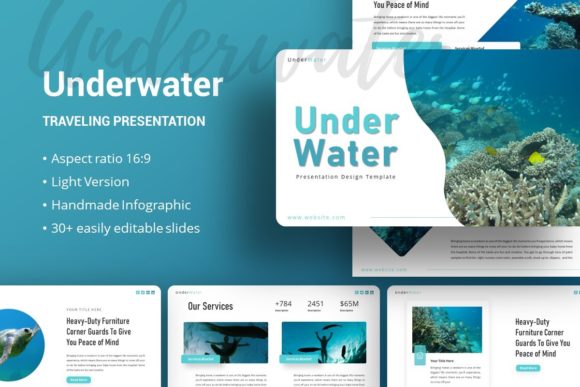
For Photographers and visual artists, this template acts as a neutral yet atmospheric frame. The picture placeholders are designed to let high-resolution imagery take center stage without competing with heavy graphical elements. This is crucial when the portfolio piece itself contains complex colors or textures. In contrast, Educators and trainers might value the handcrafted infographics included in the file. These pre-designed visual aids can transform dry data or complex processes into digestible visuals, helping students retain information through color association and spatial organization.
Evaluating Usability Based on Skill Level
Your experience with PowerPoint significantly influences how you will interact with this asset. Beginners often fear that "customizable" means "complicated," but this template is built on Master Slides. This architecture allows users to change a font, color palette, or logo placement once on the master slide, and have it update across all 35 slides instantly. For those new to presentation design, this reduces the cognitive load of formatting and allows focus on content structure. The drag-and-drop picture placeholders further lower the barrier to entry, ensuring images snap into place without manual resizing or cropping.
Experienced designers and marketers evaluate templates differently. They look for structural integrity and editability. Because all graphics in the Presentation Template - Underwater are vector-based and resizable, professionals can deconstruct elements to create new assets. A marketing manager might extract a specific wave pattern to use in a social media graphic or resize an infographic element to fit a printed brochure. This pixel-perfect quality ensures that the assets remain crisp whether projected on a 4K screen or printed on paper, satisfying the rigorous quality standards required for commercial client work.
Prioritizing Speed Versus Creative Control
Different projects demand different balances between speed and customization. If you are a Small Business Owner preparing for next week’s investor meeting, reliability and speed are paramount. You likely do not have time to build custom charts from scratch. The inclusion of ready-made infographics and structured layouts allows you to plug in your data and finalize the deck in hours rather than days. The documentation file included with the download serves as a quick reference guide, minimizing troubleshooting time so you can meet tight deadlines with confidence.
On the other end of the spectrum, Freelancers and Designers building a personal brand may prioritize long-term usefulness and creative flexibility. For this group, the template is a starting point rather than a final product. They might mix slides from the underwater set with other assets to create a unique hybrid style. The ability to edit every graphic means the template grows with their business. Instead of purchasing a new template for every single project, they can adapt the existing color schemes and layouts to match different client identities, maximizing the return on investment over time.
Technical Considerations and File Management
Before downloading, it is practical to understand exactly what is inside the package to avoid mismatched expectations. The download includes the PowerPoint .PPTX file, which is compatible with modern versions of Microsoft PowerPoint and Keynote (with some potential formatting adjustments). The vector icons are a significant value-add, providing a consistent visual language throughout the presentation without needing external subscriptions to icon libraries.
A critical note for all users, regardless of expertise: the images shown in the preview are for demonstration purposes only and are not included in the files. This is standard practice for presentation templates due to licensing restrictions. Users must source their own photography. For the Underwater theme specifically, this means you should curate high-quality images that match the blue-teal color grading of the template before you begin editing. Using warm-toned or low-contrast photos might clash with the cool, aquatic aesthetic. Planning your image assets beforehand ensures the final result looks cohesive and intentional.
Matching the Template to Your Specific Needs
Determining if this is the right tool requires an honest assessment of your content type. If your presentation relies heavily on dense text or complex financial tables, the atmospheric nature of an underwater background might reduce readability unless carefully managed. However, if your goal is to evoke feeling, showcase visual work, or present high-level concepts, this template excels. It is particularly effective for:
- Company Profiles: Establishing a calm, trustworthy, and established brand voice.
- Pitch Decks: Creating memorable visual anchors that distinguish you from competitors using generic white slides.
- Personal Portfolios: Providing a moody, sophisticated canvas for creative work.
- Educational Content: Using color psychology to maintain engagement during longer sessions.
Ultimately, the Presentation Template - Underwater is a tool for visual differentiation. Whether you are a hobbyist documenting a dive trip or a CEO outlining a five-year strategic plan, the value comes from how well the aesthetic aligns with your message. By leveraging the master slide functionality and vector assets, users at any skill level can produce professional-grade presentations that feel bespoke rather than templated. Assess your current project needs against the features listed, ensure you have appropriate imagery ready, and utilize the documentation to streamline your workflow for the best possible outcome.