Presentation Template - Pilar: Streamline Your Design
Creating a compelling visual narrative often requires more than just good content; it demands a structural framework that guides the audience through complex information without friction. Presentation Template - Pilar serves as this foundational architecture for professionals who need to communicate ideas clearly and aesthetically. Rather than forcing users into a rigid design box, this template system offers a flexible infrastructure suitable for diverse applications, from corporate reporting to creative portfolios. The value lies not merely in the 35 included slides, but in the underlying master slide logic that allows for rapid iteration and consistent branding across lengthy decks.
Architectural Flexibility for Diverse Professional Needs
The primary advantage of adopting a structured template like Pilar is its adaptability across different professional verticals. A common pitfall with generic presentation assets is that they are often too niche-specific or too vague to be useful. Pilar bridges this gap by utilizing a modular design philosophy. For a Creative Agency or Photography Portfolio, the template provides ample negative space and image-focused layouts that let visual work take precedence over text. Conversely, for Corporate and Business contexts, the same master slides can be adapted to display data-heavy infographics and quarterly projections without looking cluttered.
Consider a startup founder preparing a Pitch Deck. Investors typically review dozens of decks weekly, making visual clarity a competitive advantage. Using Pilar’s pre-structured flow helps organize the narrative arc—problem, solution, market size, team—in a way that feels intentional rather than improvised. Similarly, freelancers building a Personal Portfolio benefit from the "Company Profile" layouts, repurposing corporate structures to showcase individual case studies and testimonials professionally. This cross-functional utility means the asset remains relevant even as your career or business pivots, providing long-term value beyond a single project.
Master Slides and Efficiency in Content Updates
Efficiency in presentation design is rarely about how fast you can drag and drop an image; it is about how quickly you can implement global changes. Presentation Template - Pilar is built on a robust Master Slide system, which is the technical backbone of any scalable PowerPoint file. When you adjust a color palette, font hierarchy, or logo placement on the master slide, those changes propagate instantly across all 35 slides. This feature is critical for teams working under tight deadlines or for individuals managing multiple versions of the same deck for different audiences.
For example, a marketing manager might need to create three variations of a campaign proposal: one for internal stakeholders, one for external partners, and one for executive leadership. With standard slides, this requires formatting each deck individually. With Pilar’s master slide architecture, you can duplicate the base file and adjust the global theme settings for each audience in minutes. This reduces administrative overhead and minimizes the risk of formatting errors, such as mismatched fonts or misaligned headers, which can subtly undermine professional credibility.
Handcrafted Infographics vs. Generic Charts
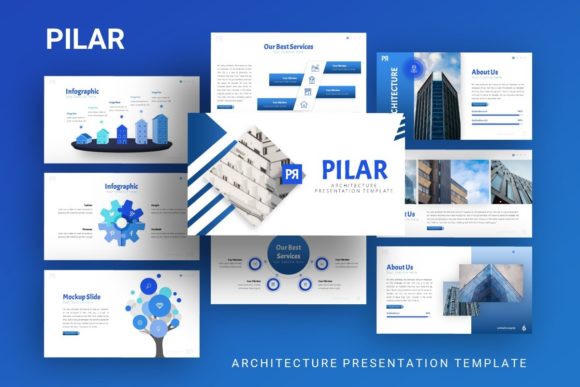
Data visualization is often where presentations fail. Standard chart tools in presentation software are functional but frequently lack aesthetic integration with the surrounding design. Pilar addresses this through handcrafted infographics that are fully editable within PowerPoint. Unlike static images imported from external design software, these graphics remain vector-based and resizable. You can change data points, colors, and labels directly in the slide editor without losing resolution or design consistency.
This capability is particularly valuable for educators and consultants who must explain abstract concepts. Instead of relying on bullet points, you can utilize pixel-perfect illustrations to map out workflows, timelines, or comparative analyses. Because the graphics are integrated into the template's style guide, they feel like a natural extension of the narrative rather than an afterthought. However, users should note that while these infographics are editable, they do require a basic understanding of PowerPoint’s shape grouping and editing tools. Those entirely new to the platform may need to consult the included documentation file to maximize this feature.
Streamlining Asset Management with Drag-and-Drop Placeholders
Visual consistency is difficult to maintain when swapping images manually. Pilar utilizes dedicated picture placeholders that enforce aspect ratios and positioning automatically. This drag-and-drop functionality ensures that whether you are inserting a landscape photograph for a travel blog pitch or a headshot for a team introduction, the image snaps into the designated frame without distortion. This seemingly small detail significantly accelerates the production process, especially for content-heavy decks like photography portfolios or product catalogs.
Furthermore, the inclusion of vector icons complements the placeholder system. Icons serve as visual anchors that help break up text and guide the viewer’s eye. Having a cohesive icon set included with the template prevents the jarring effect of mixing different illustration styles—a common mistake when sourcing free icons from disparate websites. For users creating Startup pitch decks or Company Profiles, this visual cohesion reinforces brand identity and makes the presentation feel polished and bespoke.
Practical Considerations and File Specifications
While Presentation Template - Pilar offers significant advantages, prospective users should understand the practical parameters of the files included. The package contains a PowerPoint .PPTX file, a documentation file, and vector icons. It is important to recognize that the high-quality photography seen in promotional previews is for demonstration purposes only and is not included in the download. Users must supply their own imagery. This is standard industry practice, but it means the final aesthetic quality depends heavily on the user's ability to source or create appropriate visuals.
Additionally, while the template is designed for easy customization, "easy" is relative to your proficiency with PowerPoint. The 35 slides provide a comprehensive toolkit, but maximizing the potential of the master slides and vector graphics assumes a baseline competency with the software. Professionals who have never used slide masters may find the initial learning curve steep, though the included documentation aims to mitigate this. It is advisable to spend time exploring the master view before beginning active content creation to avoid accidentally breaking global formatting links.
Evaluating Fit for Your Specific Workflow
Determining whether Pilar is the right tool requires an honest assessment of your current workflow and output needs. If you primarily create simple, text-only updates or rarely use visual aids, the advanced features of this template may be unnecessary overhead. However, for professionals who view presentations as a core communication channel, the investment in a structured template pays dividends in time savings and brand consistency.
For Creative Agencies and Freelancers, the template acts as a force multiplier, allowing you to produce high-end deliverables without hiring a dedicated designer for every pitch. For Corporate Teams, it establishes a standardized visual language that reduces review cycles and ensures compliance with brand guidelines. For Educators and Bloggers, it transforms dry information into engaging visual stories. Ultimately, Presentation Template - Pilar is less about decoration and more about providing a reliable, efficient container for your ideas. By handling the structural and aesthetic heavy lifting, it frees you to focus on what matters most: refining your message and connecting with your audience.
When comparing options, look beyond the slide count. Thirty-five slides are sufficient for most narratives, but the true metric of value is the editability of those slides. Test the master slide responsiveness and the infographic flexibility against your specific content requirements. If your work demands frequent updates, multi-format exports, or a blend of data and imagery, Pilar’s architectural approach likely offers a superior return on investment compared to simpler, static alternatives. Remember that a template is a starting point, not a finished product; its success depends on how thoughtfully you adapt its structure to serve your unique communication goals.